
If you frequently use Mega.nz to store and share large files, you may have
encountered download speed limitations when using its built-in downloader,
especially for free accounts.
Fortunately, you can use Internet Download Manager (IDM), a powerful tool for
speeding up downloads, to get around these restrictions.
This blog post will guide you through a simple and effective method to
download Mega files using IDM.
How to Download Mega Files with IDM

Requirements
1. Mega.nz or Mega.io account (free or premium).
2. Internet Download Manager (IDM) installed on your computer. [Download IDM Pre Activated]
3.
Mega Downloader tool
or MegaSync (Optional but recommended).
Step-by-Guide to Download Mega Files with IDM
While IDM cannot directly download files from Mega.nz, you can use third-party
tools like Mega Downloader or MegaSync to bypass this limitation. These tools
can generate a direct download link from Mega.nz, which IDM can process. Let’s
have a look at how to do that.
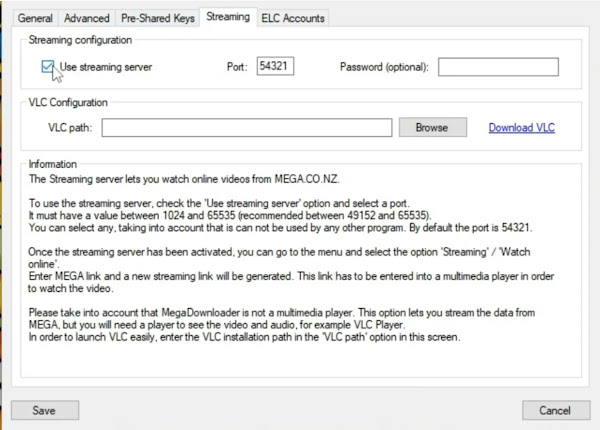
Configure Mega Downloader
- Open Mega Downloader.
- Navigate to Options > Configuration > Streaming.
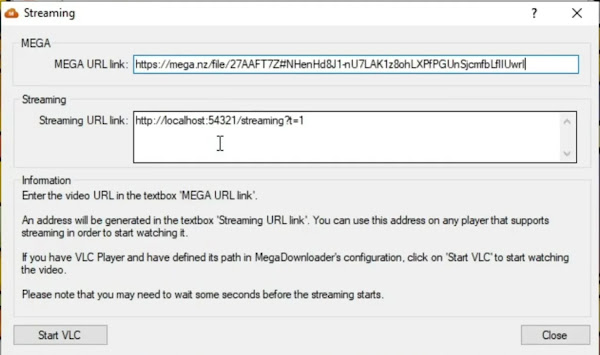
Get Mega File Streaming URL from Mega Downloader
- In Mega Downloader, go to Streaming > Watch Online.
- Copy the Streaming URL link that Mega Downloader generates.
Add URL in IDM or Other Download Manager or Web Browser
- Open IDM.
- Click on the Add URL option located at the top left corner.
- Paste the copied Streaming URL into the URL box.
IDM will automatically detect the file name and size.
Click the Start Download button to begin downloading the Mega file.
Pause or resume the download whenever you need.
Set download priorities or schedule it for a later time.
Why Use IDM for Mega Downloads?
-
Faster download speeds: IDM accelerates downloads by splitting files into
multiple segments and downloading them simultaneously. -
Pause and resume: Unlike the standard Mega downloader, IDM lets you pause
and resume downloads at any time, even if your internet connection is
interrupted. -
Efficient for large files: Downloading large files with IDM is more reliable
and quicker, especially when dealing with multi-gigabyte data.
Tips for Optimizing Mega Downloads with IDM
-
Avoid Free Account Limitations: Mega imposes download limits on free
accounts. If you exceed the bandwidth, wait a few hours or upgrade to a
premium Mega account. -
Batch Downloading: If you have multiple files, IDM can manage them in a
queue for a more organized download process. -
Monitor Connection Stability: Keep your internet connection stable to
prevent interruptions. If a download is interrupted, IDM allows resuming,
but it depends on the server’s support for resume functionality.
The next time you need to download a large file from Mega, give this method a
try to save time and bandwidth!
FAQs
Can IDM download files directly from Mega.nz?
No, Mega.nz uses its own download manager. However, tools like Mega Downloader
can generate direct download links that IDM can handle.
Is it safe to use Mega Downloader with IDM?
Yes, Mega Downloader is a widely used tool and is considered safe for use.
However, always download it from trusted sources.
Will IDM work with large Mega files?
Yes, IDM can handle large files effectively. If you have a premium Mega
account, you’ll face fewer restrictions and faster downloads.