
Are you facing the dreaded “Permission denied. Please check your firewall
Settings and ensure that IDM has permits to access the Internet.” IDM issue?
Don’t worry; in this guide, I will show you how you can get rid of it in just
3-5 clicks.
This error commonly occurs when you install IDM (Internet Download Manager) on
your Windows PC, but it is not allowed through the Windows firewall. To
resolve this issue, you need to add IDM to the Windows firewall and allow it
to run on both public and private networks.
Helpful posts:
Fix IDM Firewall Permission Denied Error

Here are the steps to fix the IDM firewall error problem:
- Press the `Windows key + S` to open the search bar.
-
Type “allow an app through Windows Firewall” and select “Allow an app
through Windows Firewall” from the search results.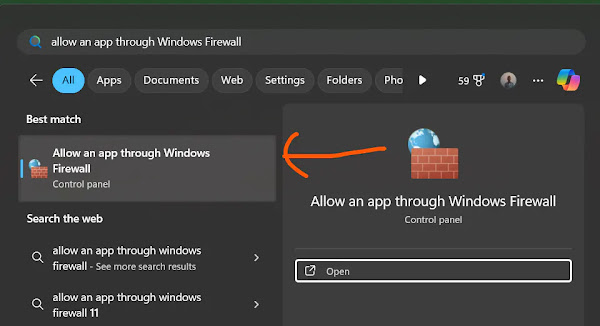
-
Click on the “Change settings” button (you may need admin privileges for
this). -
Scroll through the list of allowed apps and features until you find
“Internet Download Manager.” - If IDM is not listed, click on the “Allow another app” button.
-
Click the “Browse” button and navigate to the location where IDM is
installed (usually in `C:Program Files (x86)Internet Download Manager`). - Select `IDMan.exe` and click “Open.”
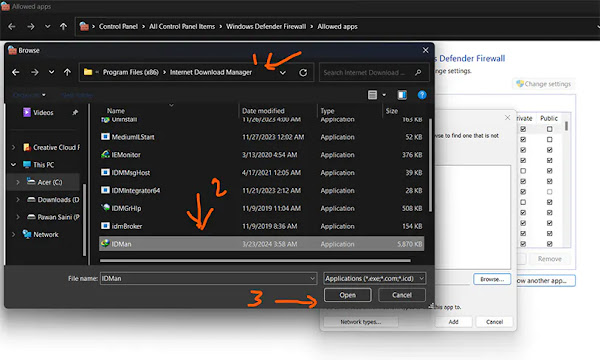
- Click “Add” to add IDM to the list of allowed apps.
-
Once IDM is added to the list, make sure both the checkboxes for “Private”
and “Public” are checked next to IDM. -
Click “OK” to save the changes and close the Windows Defender Firewall
window.
That’s it! You have successfully allowed IDM through the Windows firewall.
Now, IDM should be able to access the Internet without any firewall-related
issues, and you can enjoy uninterrupted downloading.
You may like to read these posts:
Remember, it’s essential to keep your firewall settings updated and ensure
that only trusted applications are allowed through for security reasons.
How to Fix:
- Error: Cannot launch IDM, either IDM application is not installed, or some of its files are corrupted
- IDM Integration Module This Extension may have been Corrupted
- This version of IDM does not support this type of downloading
- Permission Denied IDM Firewall Error
- Cannot transfer the download to IDM
- IDM HTTP/1.1 403 Forbidden
- This extension may soon no longer be supported IDM