
Are you encountering the dreaded “Cannot Launch IDM” error? Fret not, as we’ve
got you covered! This pesky issue often arises due to various reasons such as
outdated IDM extensions, terminated IDM tasks, or corrupted IDM files.
But fear not, because we’re here to walk you through the process of resolving
this issue step by step.
Useful posts:
Error: Cannot launch IDM Solution

Now, let’s dive into the solution! Follow these steps diligently to resolve
the “Cannot Launch IDM” error:
-
Remove IDM Extension: Start by removing the IDM extension from your browser.
This ensures a clean slate for the reinstallation process.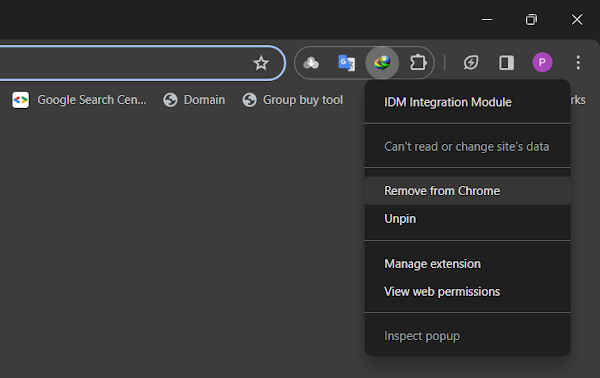
-
Update IDM: Next, ensure you have the latest version of Internet Download
Manager installed. Updating IDM eliminates any bugs or compatibility issues
that may be causing the error. Download Latest Version of IDM. -
Reintegrate IDM Extension: After updating IDM, it’s time to reintegrate the
IDM integration module into your browser manually.

Follow the step-by-step guides provided on our blog for seamless integration:
Troubleshooting Tips
Sometimes, despite following the prescribed steps, the error persists. In such
cases, try these troubleshooting tips:
-
Clear Browser Cache: Clearing your browser’s cache can resolve any caching
issues that may interfere with IDM’s functionality. -
Disable Antivirus/Firewall: Occasionally, antivirus or firewall settings may
block IDM’s operations. Temporarily disable them to see if it resolves the
issue. -
Reinstall IDM: If all else fails, consider reinstalling IDM from scratch.
This ensures a clean installation devoid of any lingering issues.
Video Guide on How to Get Rid of Cannot launch IDM, either IDM application is not installed, or some of its files are corrupted error.
Common Causes of the IDM Error: Cannot launch IDM, either IDM application is
not installed, or some of its files are corrupted
To effectively tackle the issue, it’s essential to identify its root causes.
Outdated IDM extensions, prematurely terminated IDM tasks from the taskbar, or
the deletion/corruption of IDM files can trigger this error. By recognizing
these triggers, we can formulate a targeted solution to get IDM up and running
smoothly again.
How to Fix:
- Error: Cannot launch IDM, either IDM application is not installed, or some of its files are corrupted
- IDM Integration Module This Extension may have been Corrupted
- This version of IDM does not support this type of downloading
- Permission Denied IDM Firewall Error
- Cannot transfer the download to IDM
- IDM HTTP/1.1 403 Forbidden
- This extension may soon no longer be supported IDM
Conclusion
By following the steps outlined in this guide, you should be able to bid
farewell to the dreaded “Cannot Launch IDM” error once and for all. Remember,
keeping your IDM software and browser extensions up to date is key to
preventing such issues in the future. Now, go ahead and enjoy uninterrupted
downloading with IDM!
Say goodbye to frustrating error messages and hello to seamless downloading
with IDM. For more tech tips and tutorials, stay tuned to IDMExtension.com!
Remember, a well-maintained IDM setup ensures smooth downloading experiences
every time. So, bookmark this guide for future reference and share it with
anyone facing similar issues. Happy downloading!