
Are you seeing a cross on the IDM extension in Google Chrome, with the IDM
extension icon darkened and not working? Don’t worry; in this guide, I will
show you how you can get rid of it in just 3-5 clicks.
This error occurs when you install an older version of the IDM integration
module in your browser that is not compatible with the version of Internet
Download Manager (IDM) you have installed on your Windows PC.
How to Fix IDM Extension not Working in Chrome [Cross Issue]
![How to Fix IDM Extension not Working in Chrome [Cross Issue]](https://blogger.googleusercontent.com/img/b/R29vZ2xl/AVvXsEjUqoXyT0Ou6BbQ94PEvMCoEy70rQCVLtnihhZVMgvh0dJecFjnLRc0ZoINZxLdqZViGh1xhHNxsoWYONeMsFii7gmBNQzGC1c9q1hvztSQWNnFQwIkrYEPIeQWA44fDCEX1c6K7mC4zxpVObdlUoK-_4qVnxRZuczRiebagkq6gU_5unci69odq5ZGSgw/s1280/fix-idm-showing-cross-in-google-chrome.webp)
To fix this issue, you need to:
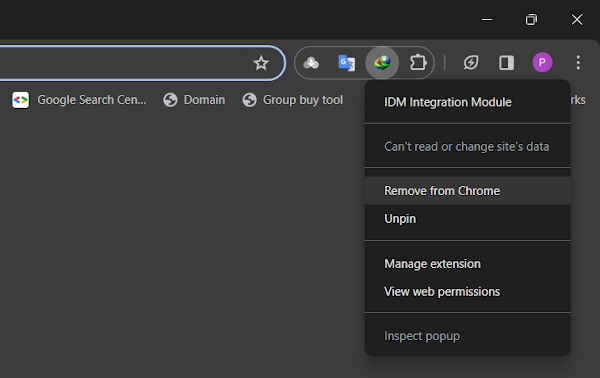
- Remove the old IDM integration module from your browser.
- Download and install the latest version of IDM.
- Add IDM to your browser manually using IDMCC.

Follow these guides to Know How to Install IDM Extension Manually:
Following these steps will ensure that your IDM and its extension work
perfectly without any issues. Let’s delve into how to integrate the IDM
extension with your favorite browser manually.
How to Fix:
- Error: Cannot launch IDM, either IDM application is not installed, or some of its files are corrupted
- IDM Integration Module This Extension may have been Corrupted
- This version of IDM does not support this type of downloading
- Permission Denied IDM Firewall Error
- Cannot transfer the download to IDM
- IDM HTTP/1.1 403 Forbidden
- This extension may soon no longer be supported IDM