
Are you looking to turbocharge your download speeds while maintaining your
privacy and anonymity online?
Look no further than the integration of Internet Download Manager (IDM)
extension with Tor Browser. This powerful combination not only makes your
downloading process more efficient but also ensures your online activities
remain secure and private.
In this guide, we’ll walk you through the seamless integration of IDM
extension into Tor Browser, allowing you to enjoy faster downloads without
compromising on privacy. Whether you’re a seasoned Tor Browser user or new to
the world of online privacy, adding IDM extension to your browsing arsenal
will undoubtedly enhance your overall experience.
Let’s delve into how you can effortlessly combine IDM’s download management
prowess with the anonymity and security features of Tor Browser.
How to Add IDM Extension in Tor Browser
Download the latest Internet Download Manager IDM Integration Module idmmzcc3.xpi [IDM CC] file to integrate IDM manually into Tor browser.
Follow these simple steps to seamlessly add IDM to your Tor Browser:
- Update Tor Browser: Ensure you are using the latest version of Tor Browser to benefit from security updates and compatibility enhancements.
- Access Add-ons Manager: Open Tor Browser, go to the Add-ons Manager by pressing Ctrl+Shift+A or clicking on the three lines/dots on the top-right corner and selecting Add-ons and themes.
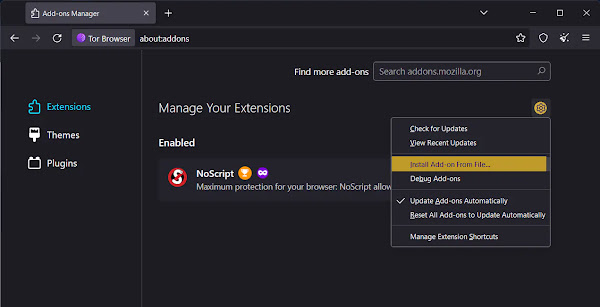
- Within the Add-ons Manager, click on the settings icon. And select “Install Add-on From File” Option: Choose this option to manually add the IDM extension to Tor Browser.
- Locate IDM XPI File: Go to the directory where IDM is installed on your system (usually
C:Program Files (x86)Internet Download Manager) and select the idmmzcc3.xpi file.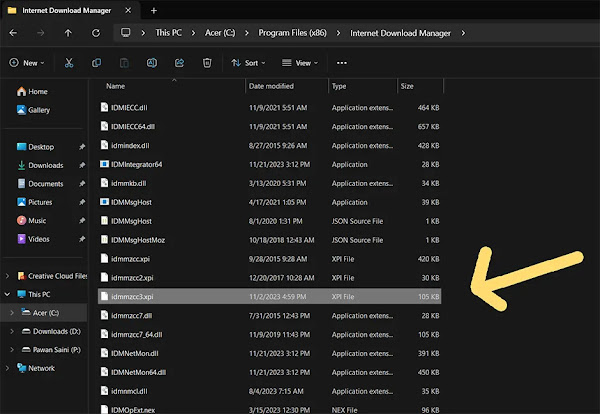
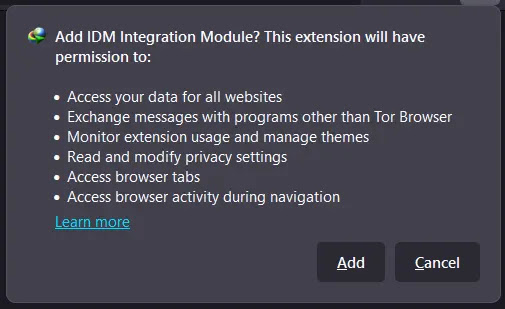
- Confirmation Message: Tor Browser will display a confirmation message; click “Add” to start the integration process.
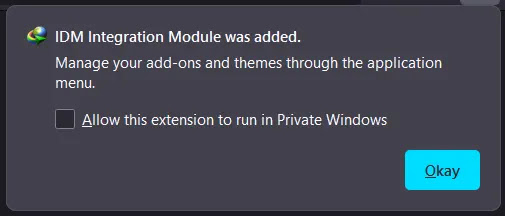
- Done!: Congratulations! IDM is now successfully integrated into your Tor Browser, enhancing your download management capabilities. Allow “Run in Private Windows” If you want to use IDM integration in Private browsing mode.
You may like to read these posts:
How to Fix:
- Error: Cannot launch IDM, either IDM application is not installed, or some of its files are corrupted
- IDM Integration Module This Extension may have been Corrupted
- This version of IDM does not support this type of downloading
- Permission Denied IDM Firewall Error
- Cannot transfer the download to IDM
- IDM HTTP/1.1 403 Forbidden
- This extension may soon no longer be supported IDM