
Are you facing the frustrating error message, “This version of IDM does not
support this type of downloading,” while trying to download files using
Internet Download Manager (IDM)?
Don’t worry! In this comprehensive guide, I’ll walk you through the steps to
resolve this issue in just 3-5 clicks.
This error typically occurs when you have an older version of IDM installed on
your Windows PC that isn’t compatible with the file type you’re attempting to
download.
But fear not, the solution is straightforward and can be done with ease.
Top posts:
How to Fix This version of IDM does not support this type of downloading

-
Uninstall the Old IDM Version: The first step in resolving this issue is to
uninstall the outdated version of IDM from your PC. This ensures that no
conflicting settings or configurations are causing the error.
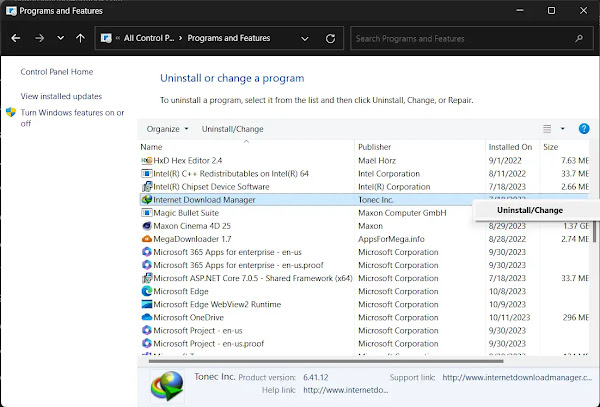
Simply
navigate to your Control Panel, locate Internet Download Manager in the list of installed
programs, and select “Uninstall.” -
Download and Install the Latest IDM Version: Once you’ve removed the old
version, it’s time to upgrade to the latest version of IDM.Head over to the
official IDM website internetdownloadmanager.com and download the newest version compatible with your
system. Follow the on-screen instructions to install it on your PC. -
Manually Add IDM Extension to Your Browser: To ensure seamless integration
between IDM and your browser, it’s essential to add the IDM extension
manually.This step is crucial in ensuring that IDM functions correctly
without any issues.
Read these posts to Add IDM Extension Manually in Different Browsers:
By installing the IDM extension through IDMCC, you can confirm that both IDM
and its extension work flawlessly together, enhancing your downloading
experience.
Additional Troubleshooting Steps
If the error persists even after updating IDM and adding the extension,
there’s still hope. You can try the following troubleshooting steps:
- Hover over the download button of the desired file.
Right-click and select “Inspect” from the options.
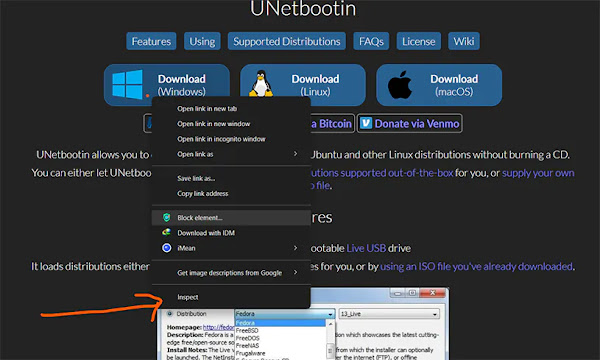
-
Locate the highlighted section with the download link, copy it, and paste it
into IDM’s “Add URL” section.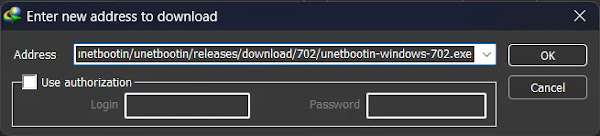
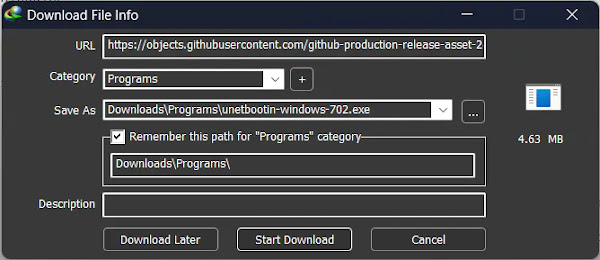
This method bypasses any compatibility issues and allows IDM to download the
file directly.
How to Fix:
- Error: Cannot launch IDM, either IDM application is not installed, or some of its files are corrupted
- IDM Integration Module This Extension may have been Corrupted
- This version of IDM does not support this type of downloading
- Permission Denied IDM Firewall Error
- Cannot transfer the download to IDM
- IDM HTTP/1.1 403 Forbidden
- This extension may soon no longer be supported IDM
Conclusion
By following the steps outlined in this guide, you can effectively resolve the
“This version of IDM does not support this type of downloading” error and
enjoy uninterrupted downloading with IDM. Remember to bookmark
IDMExtension.com for future reference and updates on IDM extensions.
Don’t let technical glitches hinder your downloading experience. With these
simple solutions, you can overcome any obstacles and make the most out of
Internet Download Manager. Happy downloading!